C2C vs. Graphghan vs. Tapestry Crochet: Choosing Grid Size, Colors & Cleanup
Choose C2C, graphghan or tapestry for a photo chart. Compare direction, fabric, bobbins, carried yarn and practical 48, 96 and 128-cell grids.
StitchSnapLast updated
Choose C2C for diagonal tiles and bold blanket motifs, graphghan in horizontal rows for large blocks of color, and tapestry for compact motifs with frequent color changes. Graphghan describes a blanket made from a chart and can include C2C. StitchSnap uses the Graphghan mode label for horizontal written rows, and Tapestry for a colorwork workflow where yarn can be carried.
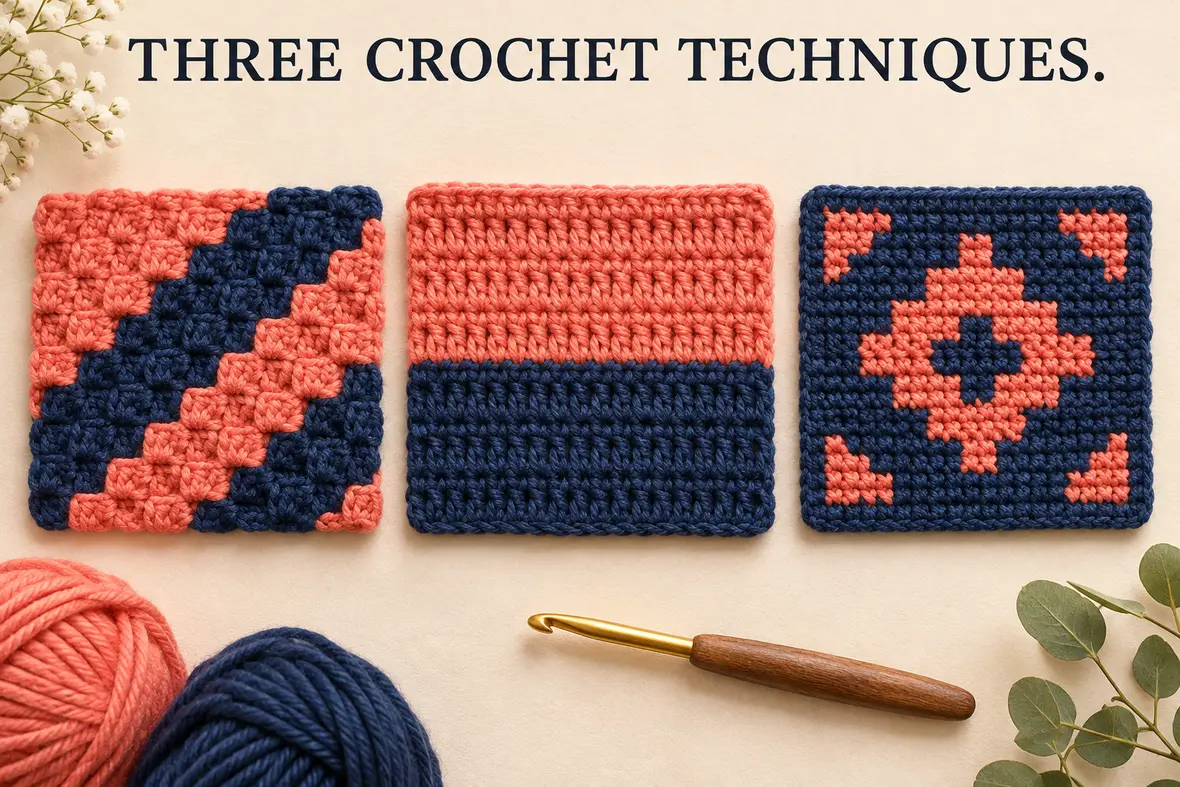
Compare the three ways to work a pixel chart
| Factor | C2C | Row-by-row graphghan | Tapestry crochet |
|---|---|---|---|
| Reading order | Diagonals from a corner | Horizontal rows, with direction alternating on turned work | Horizontal rows or rounds as specified by the pattern |
| Chart cell | One tile made of several stitches | Usually one stitch | Usually one stitch |
| Fabric | Raised tile texture, with drape dependent on the yarn and hook | Depends on the stitch, with room to keep broad panels supple | Carried strands can add thickness and reduce drape |
| Managing color | Small balls or bobbins for separate sections | Use separate bobbins for separated blocks, or short floats where appropriate | Carry the unused strand inside stitches over short spans |
| Good first project | Two-color throw with a broad silhouette | Name blanket or wall hanging with clean edges | Compact pouch, coaster or geometric panel |
The direction is the first decision. Rotate or mirror an asymmetric image only after verifying how the chart assigns its starting corner and right side. A readable photo preview can still be backwards if you interpret the written rows from the wrong side. Put one marker on the right side of the swatch before the first color change. Read a crochet pattern
Pick 48, 96 or 128 cells for the real fabric
A 48 × 48 chart has 2,304 cells. Start there for simple logos, hearts, and silhouettes. A 96 × 96 chart has 9,216 cells and gives room for facial features or a larger motif. A 128 × 128 chart has 16,384 cells and can retain more detail. Each step gives the hands more work, so decide after checking physical size and color runs.
Worked example with the same 96-cell photo
At 0.75 in per C2C tile, a 96-cell-wide chart makes a 72 in panel. A horizontal swatch with 20 stitches over 4 in gives a 19.2 in panel at 96 stitches. The difference comes from the chart cell’s physical size. A horizontal chart with 16 rows over 4 in gives 24 in of height at 96 rows. If you want a visually square motif, account for that wider-than-tall stitch count in your chart or crop. Estimate panel dimensions
Run a color-change test before increasing the grid
- Crop to the subject and adjust the background so features remain distinct.
- Start with the fewest colors that separate the subject from the background. Inspect the preview from arm’s length.
- Open a representative row in the middle of the motif and count separate runs. The same blue may appear in four separate runs with background between them.
- Raise the cleanup setting gradually. Compare the eye, outline and letters before and after. The eight-neighbor filter examines surrounding cells, including diagonals.
- Restore any intentionally isolated highlights using the cell editor. Check at least one early, middle and late row. The middle of a C2C blanket can be where bobbin management is hardest.
Decide between bobbins and carried yarn
Use bobbins when there are large, separated color blocks. Put one bobbin near each area and join at the boundary. Even two areas using the same shade can be easier to control with separate lengths. This also avoids bringing a dark strand through a wide pale background.
Carry a spare yarn inside the fabric for tightly spaced changes when the pattern calls for it. Make a sample with a pale background and dark motif. If the carried strand shows through, adjust tension or choose a different shade combination. Count the extra yarn needed by the carried strand in your sample so the shopping estimate reflects the fabric you will make.
If a C2C design has frequent isolated cells, reduce the color count and simplify the source first. A small outline adjustment can remove several yarn changes while preserving the shape. If you prefer crisp fine lettering, try a two-color horizontal graph and check it with the same yarn. Generate a name chart
Open the C2C pattern generator · Open the graphghan generator · Open the tapestry tool · Convert a photo to a crochet pattern
FAQ
Is graphghan a crochet stitch?
Graphghan usually describes a blanket based on a chart. You can work one in C2C tiles or horizontal stitches. Check the pattern’s gauge and reading direction to see which construction it uses.
What size chart should I use for a portrait?
Compare 48 and 96 cells across with the same crop. If 96 cells preserve the important features, use your gauge to check the physical size before trying 128.
Can I keep a single highlight after cleanup?
Yes. Reduce the cleanup setting or repaint that cell. Check its corresponding written color run to see whether the extra yarn change is worthwhile.
How do I set aside extra yarn for tapestry?
Make the gauge swatch with the same carried strands and colors planned for the project. Record the length used per sample and round by color. Yarn yardage guide · Compare Stitch Fiddle and StitchSnap
Once you have chosen a technique, follow the StitchSnap guide to build, preview, and export your chart.