How to Use StitchSnap: Photo-to-Crochet Workflow, Free Tools & Pricing Guide (2026)
Turn a photo, name, or AI idea into a crochet chart. Follow four steps, reproduce two yarn estimates, and compare StitchSnap’s free tools and paid plans.
StitchSnapLast updated
Quick Answer
StitchSnap is a browser-based crochet chart tool that turns photos, custom text, or AI illustrations into C2C, Graphghan, and Tapestry pixel grids with written row instructions. Photo conversion runs locally without sending private photos to third-party AI. Calculators, converters, and watermarked previews are free. One complete watermark-free PDF costs $4.99 once, without a required subscription.
1. Which StitchSnap tools are 100% free without an account?
The C2C blanket size and yarn calculator estimates finished dimensions, diagonal rows, square count, and total yarn from a measured swatch. Keep it open while comparing two blanket sizes. An identical chart can make a different-sized blanket with a different hook, so change the swatch values before comparing the results.
The crochet converter looks up hook sizes, yarn weights, and stitch names. Check your hook’s millimeter marking when two brands use the same letter for different sizes. For stitch terms, confirm the pattern’s notation before working a row. US double crochet (dc) corresponds to UK treble crochet (tr).
The workbench lets you convert a photo in the browser, clean stray colors, estimate yarn, read the first 10 written rows, and download a watermarked PDF preview. Save Preview creates a private session for up to seven days. Use the same browser to restore it while the session is valid. AI image generation requires an account and AI points.
2. How do I turn a photo, name, or AI idea into a crochet pattern step by step?
Measure a swatch and set your grid size
Crochet a swatch with the yarn, hook, and stitch you plan to use. Enter its measurements and yarn use in the C2C blanket calculator, then adjust grid width and height until the result fits your project. Use the calculator’s workbench link to carry the grid dimensions and crochet mode over. Set aside room for a border when you choose the body size.
Choose a photo, custom text, or an AI illustration
Open Photo to Crochet Pattern to choose a JPG, PNG, or WebP. For a name or date, open the Crochet Letter & Name Generator, enter supported characters, and set the foreground, background, and margins. For a new illustration, open AI Studio in the workbench, sign in, choose a resolution, and generate the image using points. Keep the shape large in the frame so it survives downsampling.
Reduce colors, clean speckles, and edit individual cells
Choose a palette size you can manage during color changes. Apply automatic speckle cleanup and compare the eyes, outlines, and fine lettering with the source. If cleanup removes a detail you want to keep, reduce its strength or click a cell to repaint it with a selected color. Use Undo to reverse a manual edit. Check the row preview to see how often the yarn changes.
Preview, unlock, and print the PDF
Read the first 10 rows and download the watermarked preview to check text size, chart orientation, and legend colors. When the chart is ready, use an eligible unlock or Creator Pro for the complete PDF with every written row. Select A4 or US Letter to match your printer. Keep the legend beside the numbered rows so you can check color codes as you work.
In C2C, a row travels along a diagonal of tiles. Graphghan and Tapestry use horizontal rows in the workbench. Choose the technique before reviewing the row instructions, because the paths through the same grid differ. Compare C2C, Graphghan, and Tapestry.
3. What does a real pet photo look like on a 96 × 96 crochet chart?
Load StitchSnap’s built-in corgi photo and set the chart to 96 × 96 in C2C mode. The grid contains 9,216 squares and 191 diagonal rows. A rectangular C2C chart has width + height − 1 diagonal rows, so here the count is 96 + 96 − 1. With a square crop, position the face so both eyes and the dark edge of the nose are easy to locate.
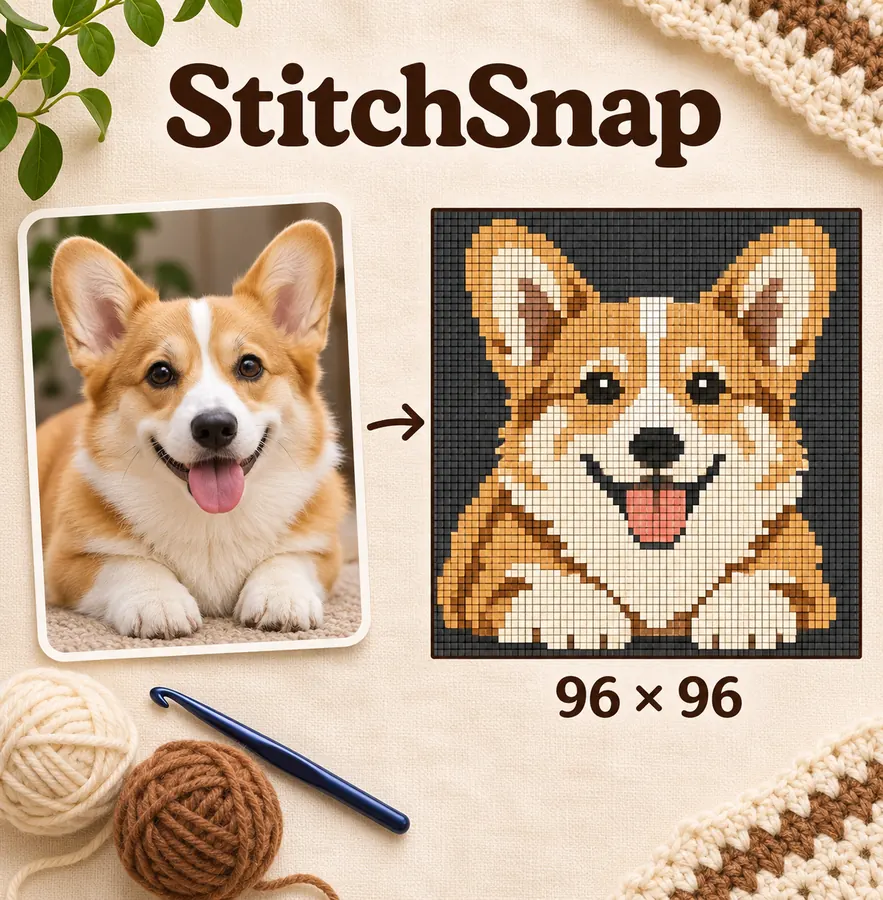
Illustration of the photo-to-chart workflow. Use the built-in corgi photo and the dimensions above to reproduce the example in the workbench.
Start with medium automatic cleanup. Check the background for isolated squares, then compare the eyes and nose with the original at the same crop. Read the legend by code and color name, such as C1 White or C2 Brown. The actual palette depends on the crop, palette size, and cleanup. Code numbers and swatches distinguish colors when two shades have the same basic name.
The workbench’s default yarn estimate uses 0.12 yd per square and a 10% allowance. Across 9,216 squares that is about 1,216.51 yd before rounding each color’s estimate. Its per-color skein counts round up separately. Recalculate from a swatch before buying yarn, especially when the photo has several low-volume colors.
Can I reproduce the 64 × 80 calculator result?
Yes. In the blanket calculator, select C2C, use inches and yards, enter 64 × 80, and keep the default medium preset, 10% reserve, and 250 yd per skein. The preset assumes 0.5 yd per tile, equivalent to 8 yd for a 4 × 4 swatch. That gives 143 diagonal rows, 5,120 squares, and 12 skeins. Multiply 5,120 by 0.5 and then by 1.10 to get 2,816 yd. Dividing by 250 gives 11.264, rounded up to 12. This is a planning total across colors. The final chart lets you round the count up for each color separately.
4. How much does StitchSnap cost, and which plan should I choose?
Prices below are in USD. The StitchSnap pricing page shows the current offers and billing intervals before checkout.
| Plan | Price | What it includes | Who should choose it |
|---|---|---|---|
| Free Preview | $0 | Calculator and converter, browser preview, speckle cleanup, yarn estimate, first 10 written rows, 7-day private save, and watermarked PDF preview | Anyone testing a photo or planning a size |
| Single Pattern | $4.99 once | One permanent unlock with all written rows and a watermark-free A4 or US Letter PDF. Personal use. | Someone making one pet blanket or gift |
| 3-Pattern Bundle | $9.99 once, $3.33 per pattern | Three permanent unlocks with no expiration or renewal. Personal use. Listed as “buy 2, get 1 free” on the pricing page. | A hobbyist planning two or three projects |
| Creator Pro | $19.99/month, $59.99/quarter, $179.99/year (25% below 12 monthly payments, rounded) | Unlimited watermark-free PDFs, commercial sales license, cloud project history, and 180 / 600 / 2,400 AI points per monthly / quarterly / annual cycle | Etsy sellers and frequent designers |
If you need a specific result, which option fits?
- If you only need a size, conversion, or test chart → Choose Free Preview. Plan sizes in the C2C calculator and test your image in Photo to Crochet Pattern.
- If you need one complete personal pattern → Choose Single Pattern. Unlock the version you have already checked in the workbench.
- If you expect a third personal project → Choose the 3-Pattern Bundle. For exactly two projects, two Single Pattern purchases total $9.98. The bundle is $9.99 and includes the third unlock.
- If you sell eligible charts or produce them frequently → Choose Creator Pro. Compare recurring intervals on the pricing page and review the commercial license before listing a design.
Optional AI point packs cost $4.99 for 100, $9.99 for 250, or $19.99 for 600. One generation uses 3 points at 1k, 5 at 2k, or 8 at 4k. You can download the generated high-resolution original directly.
5. What is the difference between AI points and pattern unlocks?
AI points pay for generating the source illustration in AI Studio. You can download that original image and create a free grid preview from it. A pattern unlock gives you the full crochet PDF and written rows for a specific chart. For example, generating one 2k illustration uses 5 AI points. Exporting its complete chart separately uses a paid single unlock, one bundle unlock, or Creator Pro’s PDF entitlement.
If you start with a photo or type a name, you can skip AI Studio and use no AI points. Creator Pro includes both a periodic AI point allowance and unlimited watermark-free PDF exports.
6. What can StitchSnap promise about finished size, yarn, and resale?
The grid determines the number of squares and row order. Finished dimensions and yarn usage depend on your tension, yarn, hook, swatch measurements, and border. Measure your swatch in the condition you expect for the finished blanket. Recheck width and height separately, especially if your C2C tiles are rectangular. Reserve yarn for borders and weaving in ends.
Single Pattern and the 3-Pattern Bundle cover personal use. Creator Pro is the tier with a commercial sales license for eligible designs, including Etsy use. You need rights to the source image, lettering, or artwork you use. Review StitchSnap’s terms of service before listing a pattern made from third-party material.
FAQ
Can I spend AI points to unlock the complete crochet PDF?
AI points pay for generating an illustration. The complete crochet PDF requires a Single Pattern purchase, a bundle unlock, or Creator Pro.
Will StitchSnap charge me again automatically?
Single Pattern and the 3-Pattern Bundle are one-time purchases. Creator Pro renews at the selected monthly, quarterly, or annual interval unless canceled.
Which plan lets me sell crochet patterns on Etsy?
Creator Pro includes StitchSnap’s commercial sales license. Use source material you have the right to sell. Single Pattern and the 3-Pattern Bundle are for personal use.
Does converting a private photo send it to an AI provider?
The browser converts your selected photo locally without sending it to third-party AI. If you save a private preview, StitchSnap can receive the grid and source image to restore that session. AI Studio is a separate generation feature. See the privacy policy.
Can I use centimeters and meters instead of inches and yards?
Yes. The blanket calculator supports metric and imperial measurements, and the converter cross-references common hook sizes and stitch terminology. For printing, select A4 or US Letter in the workbench.